
 United States
Stop Hunting for Customer Information Across Screens and Files

Every small business has customer information — usually more than they realize.
The real problem shows up when you actually need it.
A customer calls with a question. You open your management system for basic details, dig through an Excel file for pricing, scroll through emails for a note someone left months ago, and click through multiple screens just to rebuild the full picture.
A simple request suddenly becomes a slow, interrupted, frustrating search.
And that search comes with hidden costs:
- time lost switching between tools
- incomplete answers
- uncertainty in what you’re telling the customer
- reliance on individual memory instead of reliable data
For lean teams, these small inefficiencies add up fast.
The Hidden Cost of Chasing Customer Information
Most small teams don’t track how much time they spend looking for information — but it has a real operational impact.
Every minute spent:
- switching screens
- searching emails
- opening external files
- rebuilding customer history manually
is time taken away from real work.
Over time, this leads to:
- slower responses
- more stress on the people handling customers
- dependence on individual memory
- difficulty maintaining continuity when roles change
The problem isn’t data volume — it’s accessibility.
More Data Doesn’t Mean More Clarity
When information is scattered across systems, many businesses try to fix the problem by adding more:
- new spreadsheets
- new notes
- new reports
But more sources don’t create more control. They create more friction.
When data isn’t easy to access:
- context must be rebuilt every time
- the risk of mistakes increases
- decisions are made with partial visibility
What small businesses need is not more data, but a single, reliable view of each customer.
Why a Unified Customer View Changes Everything
A unified customer view means:
- you always know where to find information
- you don’t have to reconstruct history
- the business doesn’t depend on one person’s memory
When customer information is centralized and connected:
- work becomes smoother
- answers are more confident
- communication is more consistent
With So Smart, the Customer Becomes the Starting Point
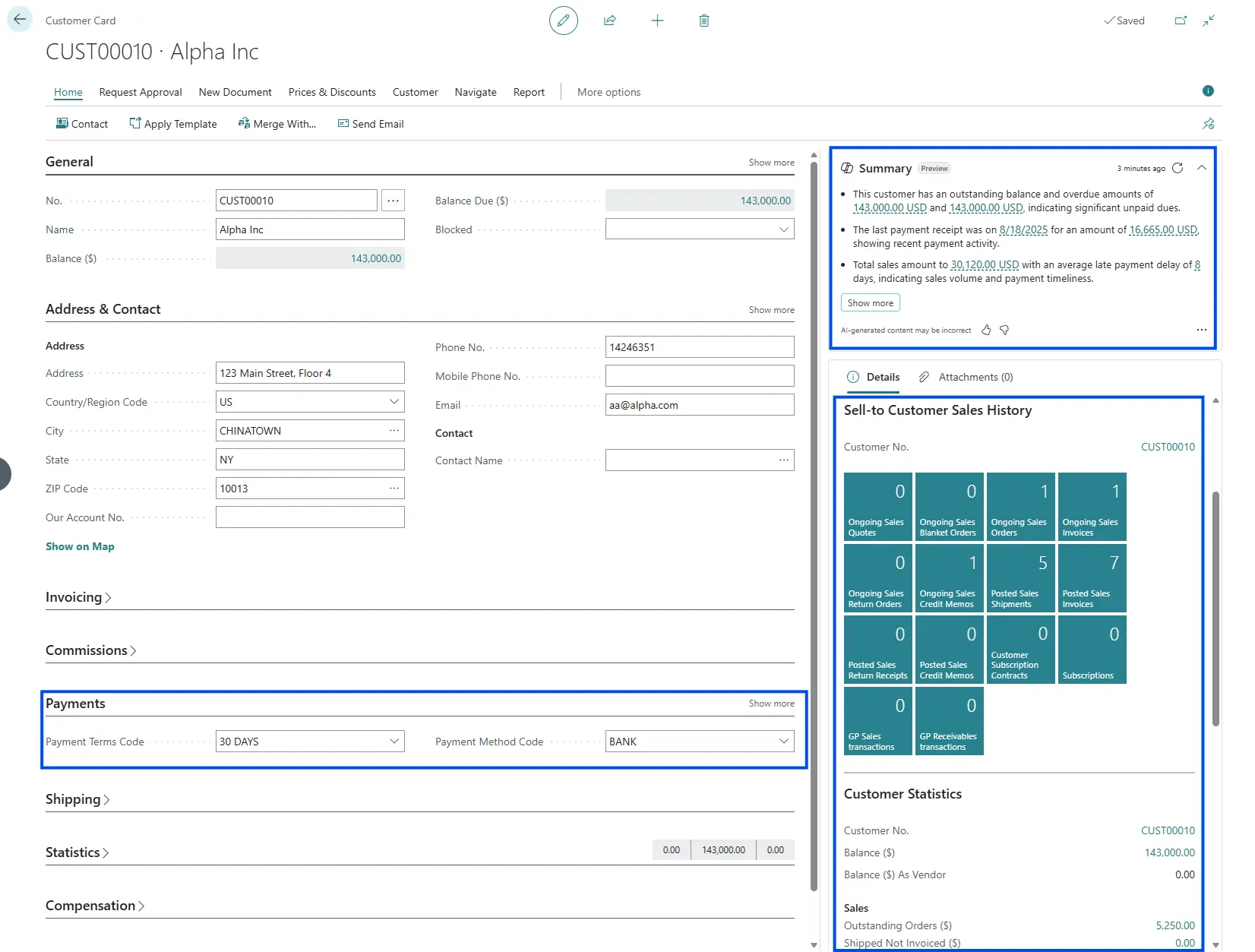
So Smart, built on Microsoft Dynamics 365 Business Central, makes the customer the central hub for all relevant information.
From a single page, you can:
- view customer details
- check pricing and settings
- access full document history
- review financial status
This drastically reduces unnecessary navigation, time spent rebuilding context, and the risk of overlooking key information.
Less Navigation, More Shared Context
When customer data is connected:
- you don’t bounce between unrelated screens
- you don’t lose track of the customer story
- you don’t restart from zero every time
This is especially important when multiple people work with the same customer, roles differ, and continuity over time is required.
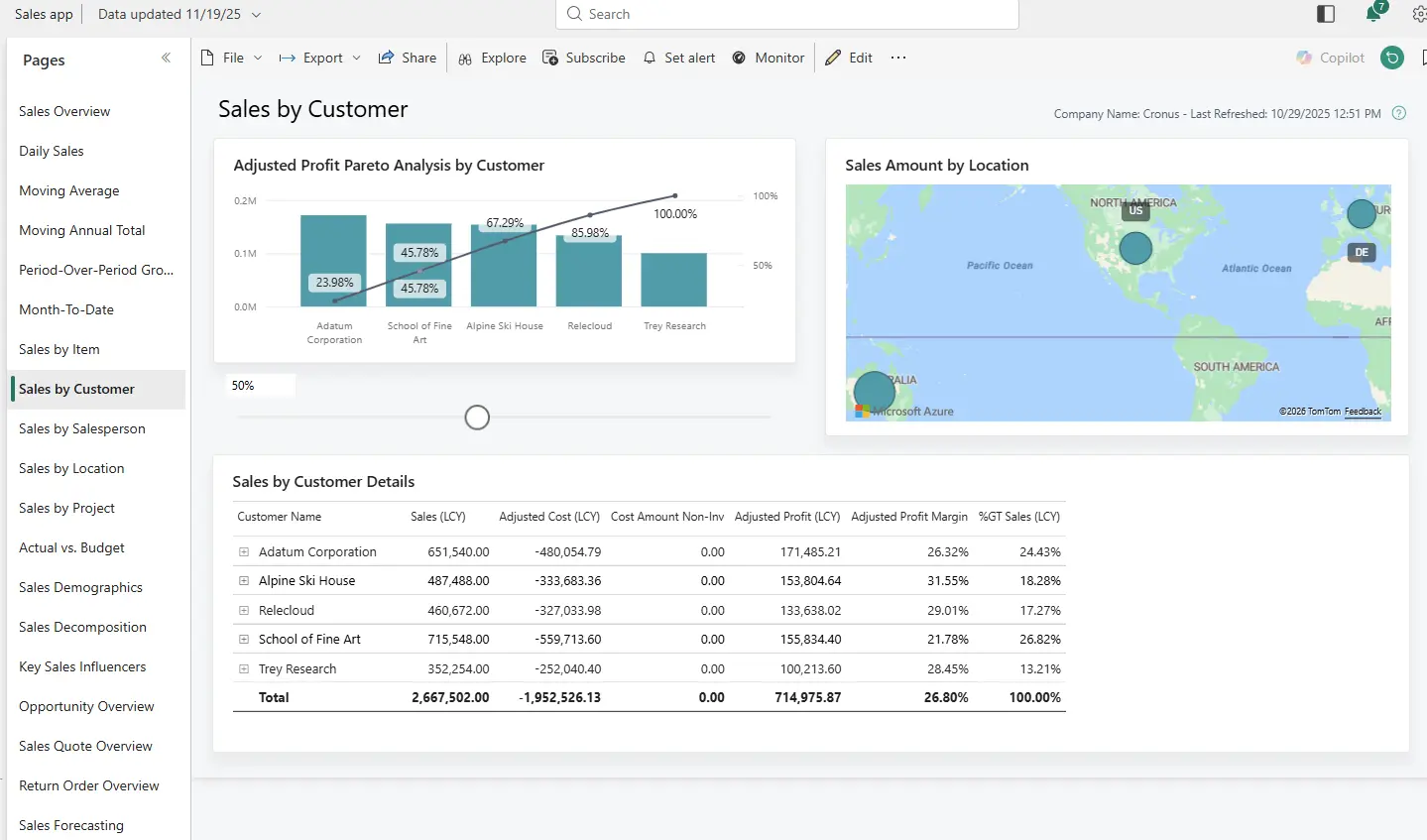
Get a Quick Read on Customer Health with Power BI
Sometimes you don’t need details — you need a fast, high-level view.
By pairing Power BI with Business Central, you can:
- get an aggregated view of customer activity
- understand trends over time
- quickly spot issues or opportunities
Power BI uses the same data already in your system, presented in a clearer and more digestible way.
In Summary
FAQ About Customer Information Management
Why does finding customer information take so much time in small businesses?
Because customer data is often spread across ERP systems, spreadsheets, emails, and multiple screens, forcing teams to manually reconstruct the full picture.
What are the consequences of fragmented customer information?
Slower responses, higher stress for employees, increased risk of errors, and strong dependence on individual memory.
What does a unified customer view mean?
It means all relevant customer information is centralized, connected, and accessible from a single point.
How do So Smart and Business Central improve customer management?
They make the customer the central access point for master data, pricing, document history, and financial information.
Why does a unified view improve collaboration between teams?
Because everyone works with the same up-to-date information, ensuring consistency and continuity across roles.
When is it useful to combine Power BI with Business Central?
When a quick, aggregated view of customer performance is needed without diving into operational details.
So Smart is the fastest and easiest way to enter the world of Microsoft Dynamics 365 Business Central. The solution that helps you automate processes, monitor data in real time, produce analytical reports and monitor compliance. So Smart is the cloud solution that can be accessed from any browser anywhere around the world. The system can be accessed from your computer, smartphone or tablet simply by installing the app. Now you can manage your business anywhere at your convenience, and it is 100 percent secure with the Microsoft Azure Cloud network.